border
sSNAKESs : Reptile Forum
 

Go Back   sSNAKESs : Reptile Forum > General Information Forums > Photography Discussion.

Notices

Closed Thread
 
Thread Tools Display Modes
Old 05-05-11, 11:15 PM   #1
Jay
Bcc fanatic
 
Jay's Avatar
 
Join Date: Oct-2010
Posts: 2,294
Country:
Canon Powershot S5is settings?

Just wondering if anybody knows the optimum settings for Indoor Snake photos on a Canon Powershot S5is
__________________
Words build bridges into unexplored regions.

http://www.youtube.com/user/jayyboy16?feature=mhee
Jay is offline  
Login to remove ads
Old 05-06-11, 04:29 AM   #2
TeaNinja
Member
 
TeaNinja's Avatar
 
Join Date: Nov-2010
Location: Sonoma, CA
Age: 37
Posts: 2,242
Country:
Re: Canon Powershot S5is settings?

nope, but i wish i did O.O
my camera is going to take the eternal dirt nap pretty soon lol.
do you have the manual? i sadly never read the manual for my camera until a few months ago and i spent like 15 minutes going "O.O omfg, is THAT what that does?????" lol
__________________
-Zak
TeaNinja is offline  
Old 05-06-11, 08:00 AM   #3
sickvenom
Former Member
 
Join Date: Apr-2011
Location: phx
Posts: 584
Country:
Re: Canon Powershot S5is settings?

Quote:
Originally Posted by jay0133 View Post
Just wondering if anybody knows the optimum settings for Indoor Snake photos on a Canon Powershot S5is
I'll reply in depth later this afternoon.....
__________________
welcome to my nightmare... i think you're gonna like it.
sickvenom is offline  
Old 05-06-11, 08:06 AM   #4
Jay
Bcc fanatic
 
Jay's Avatar
 
Join Date: Oct-2010
Posts: 2,294
Country:
Re: Canon Powershot S5is settings?

ok thanks. I dont have the manual
__________________
Words build bridges into unexplored regions.

http://www.youtube.com/user/jayyboy16?feature=mhee
Jay is offline  
Old 05-06-11, 12:52 PM   #5
sickvenom
Former Member
 
Join Date: Apr-2011
Location: phx
Posts: 584
Country:
Re: Canon Powershot S5is settings?

Ok let's start with this.....

Turn off the flash, set your white balance according to your main light source, the mode should be manual, adjust your aperature and shutter speed until your exposure looks good. These settings will vary depending on your main light source. Try to keep your shutter faster then 1/60. Let me know the results.
__________________
welcome to my nightmare... i think you're gonna like it.
sickvenom is offline  
Login to remove ads
Old 05-06-11, 12:57 PM   #6
Wolfus_305
Member
 
Wolfus_305's Avatar
 
Join Date: Nov-2008
Location: GTA
Posts: 1,061
Country:
Re: Canon Powershot S5is settings?

I have a canon camera and love it (Canon powershot G9) Good luck with the photos!
Wolfus_305 is offline  
Old 05-06-11, 01:12 PM   #7
Jay
Bcc fanatic
 
Jay's Avatar
 
Join Date: Oct-2010
Posts: 2,294
Country:
Re: Canon Powershot S5is settings?

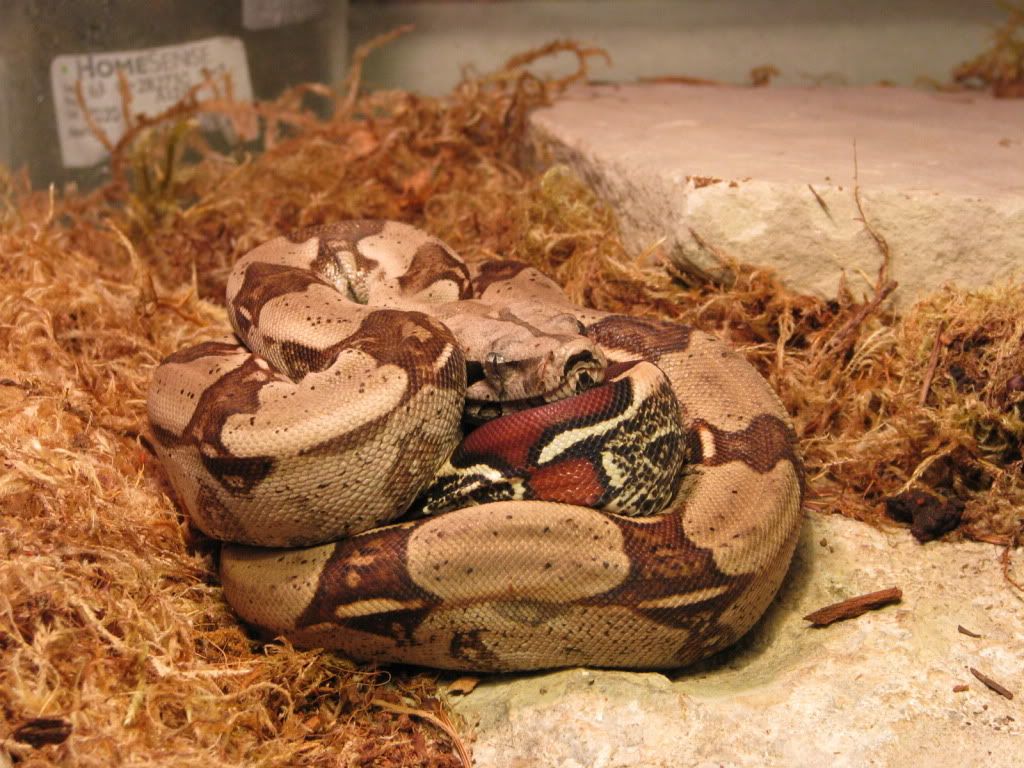
I cant figure it out this is as close to good as i can get with sickvenoms help
he is due for a shed in a week
Attached Images
File Type: jpg IMG_6924.jpg (25.4 KB, 26 views)
__________________
Words build bridges into unexplored regions.

http://www.youtube.com/user/jayyboy16?feature=mhee
Jay is offline  
Old 05-06-11, 01:19 PM   #8
Wolfus_305
Member
 
Wolfus_305's Avatar
 
Join Date: Nov-2008
Location: GTA
Posts: 1,061
Country:
Re: Canon Powershot S5is settings?

I think this could be what you're looking for
Canon U.S.A. : Support & Drivers : PowerShot S5 IS

If you scroll down you should find pdf files of manuals. make sure it's for your camera and then there's basic and advanced

Hope this helps
Wolfus_305 is offline  
Old 05-06-11, 01:27 PM   #9
Jay
Bcc fanatic
 
Jay's Avatar
 
Join Date: Oct-2010
Posts: 2,294
Country:
Re: Canon Powershot S5is settings?

I like this photo using sickvenoms advice im trying to upload it so it shows full size
__________________
Words build bridges into unexplored regions.

http://www.youtube.com/user/jayyboy16?feature=mhee
Jay is offline  
Old 05-06-11, 01:28 PM   #10
Jay
Bcc fanatic
 
Jay's Avatar
 
Join Date: Oct-2010
Posts: 2,294
Country:
Re: Canon Powershot S5is settings?

__________________
Words build bridges into unexplored regions.

http://www.youtube.com/user/jayyboy16?feature=mhee

Last edited by infernalis; 05-06-11 at 10:00 PM..
Jay is offline  
Login to remove ads
Old 05-06-11, 01:29 PM   #11
Jay
Bcc fanatic
 
Jay's Avatar
 
Join Date: Oct-2010
Posts: 2,294
Country:
Re: Canon Powershot S5is settings?

__________________
Words build bridges into unexplored regions.

http://www.youtube.com/user/jayyboy16?feature=mhee
Jay is offline  
Old 05-06-11, 09:21 PM   #12
sickvenom
Former Member
 
Join Date: Apr-2011
Location: phx
Posts: 584
Country:
Re: Canon Powershot S5is settings?

Quote:
Originally Posted by jay0133 View Post
I like this photo using sickvenoms advice im trying to upload it so it shows full size
that looks..... great!

the colors may be off a little, due to the color temperature of your light source. that is what the white balance control is for. cameras can get tricked up by the light temperature, so some post processing corrections may be needed. to make it pop a little more, i'd up the 'contrast' setting. what were your manual settings?
__________________
welcome to my nightmare... i think you're gonna like it.
sickvenom is offline  
Old 05-06-11, 09:35 PM   #13
Jay
Bcc fanatic
 
Jay's Avatar
 
Join Date: Oct-2010
Posts: 2,294
Country:
Re: Canon Powershot S5is settings?

Thanks for the advice. I always used auto setting, the pictures were ok but not the cameras potential. I can't remember the settings I used for that picture. There are down arrows you can use when your in manual....F/10..9....8 ect I fiddled with them until i got the right picture. What do they do in technical terms ? In my uneducated terms they increase and decrees the brightens.
__________________
Words build bridges into unexplored regions.

http://www.youtube.com/user/jayyboy16?feature=mhee
Jay is offline  
Old 05-06-11, 09:40 PM   #14
sickvenom
Former Member
 
Join Date: Apr-2011
Location: phx
Posts: 584
Country:
Re: Canon Powershot S5is settings?

Quote:
Originally Posted by jay0133 View Post
Thanks for the advice. I always used auto setting, the pictures were ok but not the cameras potential. I can't remember the settings I used for that picture. There are down arrows you can use when your in manual....F/10..9....8 ect I fiddled with them until i got the right picture. What do they do in technical terms ? In my uneducated terms they increase and decrees the brightens.
f stop is the aperture. that is the size of the hole in the middle of your lens, that lets light in. f2.8 is a big opening, used to let more light in, f22 is a small opening, used to let less light in. and your shutter speed is how long you want your shutter to stay open for your exposure. longer shutter speeds will over expose and shorter shutter speeds will under expose. your aperture will also control depth of field. the smaller f stop (2.8) will give a nice shallow depth of field. f22 will give you a deep depth of field. depth of field is when you focus on a subject and everything behind it is blurred.

next, maybe set your f stop to 2.8 (or whatever is 'wide open' for your camera), then use the shutter speed to find the correct exposure. compare it with your first photo. you might find that more of the background will be out of focus. this shallow depth of field keeps the eye on the subject, which will be in focus.
__________________
welcome to my nightmare... i think you're gonna like it.
sickvenom is offline  
Old 05-06-11, 09:49 PM   #15
Max713
Member
 
Max713's Avatar
 
Join Date: Apr-2008
Location: Albany, OR
Age: 37
Posts: 511
Country:
Re: Canon Powershot S5is settings?

Quote:
Originally Posted by jay0133 View Post
Thanks for the advice. I always used auto setting, the pictures were ok but not the cameras potential. I can't remember the settings I used for that picture. There are down arrows you can use when your in manual....F/10..9....8 ect I fiddled with them until i got the right picture. What do they do in technical terms ? In my uneducated terms they increase and decrees the brightens.
F/10 etc is the f-stop, or aperture. Aperture is what controls how much light your camera takes in. The smaller the number, the more wide open the aperture, or the more light the lens lets in.
Welcome to the world of photography
For now I would leave it on the "P" setting, this mode allows you to change all the setting, but automatically controls shutter speed and f stop for you. Playing with manual mode is definitely a good thing, but can be very difficult to get down for new users.
In P mode, leave your white balance on auto, you can always adjust that later in even the simplest photo editing software. Set your ISO to a nice low level, the lowest possible in high light situations, maybe bump it up to 200 or 400 if you really have poor light conditions. Just remember, the higher your ISO, the higher chance you have for noise in your shots. Other than that, just start taking pictures and experimenting! You know how I got good at taking pics of Scarlett? By taking thousands upon thousands of pictures...

There are many shooting styles, entire frame in focus (standing farther back, zooming in), just the subject in focus (getting close, zooming all the way out), wide open aperture (subject crystal clear, background slightly blurred), closed aperture (subject often times slightly less clear, more of the frame in focus.
You will find the farther you are zoomed in, the less wide open you can set your aperture, at least I'm guessing so with your camera, as I'm not particularly familiar with it. But most base level cameras have a variable aperture, the most wide open setting slowly decreasing as you zoom in farther.

EDIT: Was typing as venom posted, but he brought up a lot of similar points. Venom, are you into photography as well? I've never seen any of your work.
__________________
1.0 Argentine black & white Tegu -Kimosabi-
0.1 Coastal Carpet Python -Scarlett-

Last edited by Max713; 05-06-11 at 09:55 PM..
Max713 is offline  
Login to remove ads
Closed Thread

Thread Tools
Display Modes

Posting Rules
You may not post new threads
You may not post replies
You may not post attachments
You may not edit your posts

BB code is On
Smilies are On
[IMG] code is On
HTML code is Off

Forum Jump


All times are GMT -6. The time now is 01:05 AM.

Powered by vBulletin®
©2000 - 2026, Jelsoft Enterprises Ltd.
Copyright © 2002-2026, Hobby Solutions.

right